
Free time off request form for employees
Give your team one simple form for every leave request: vacation, sick time, personal days and unpaid leave. Edit it in Word to add your logo and policy, or print the PDF and keep a stack at the site office. Below, you'll find how to run a fair request and approval process.
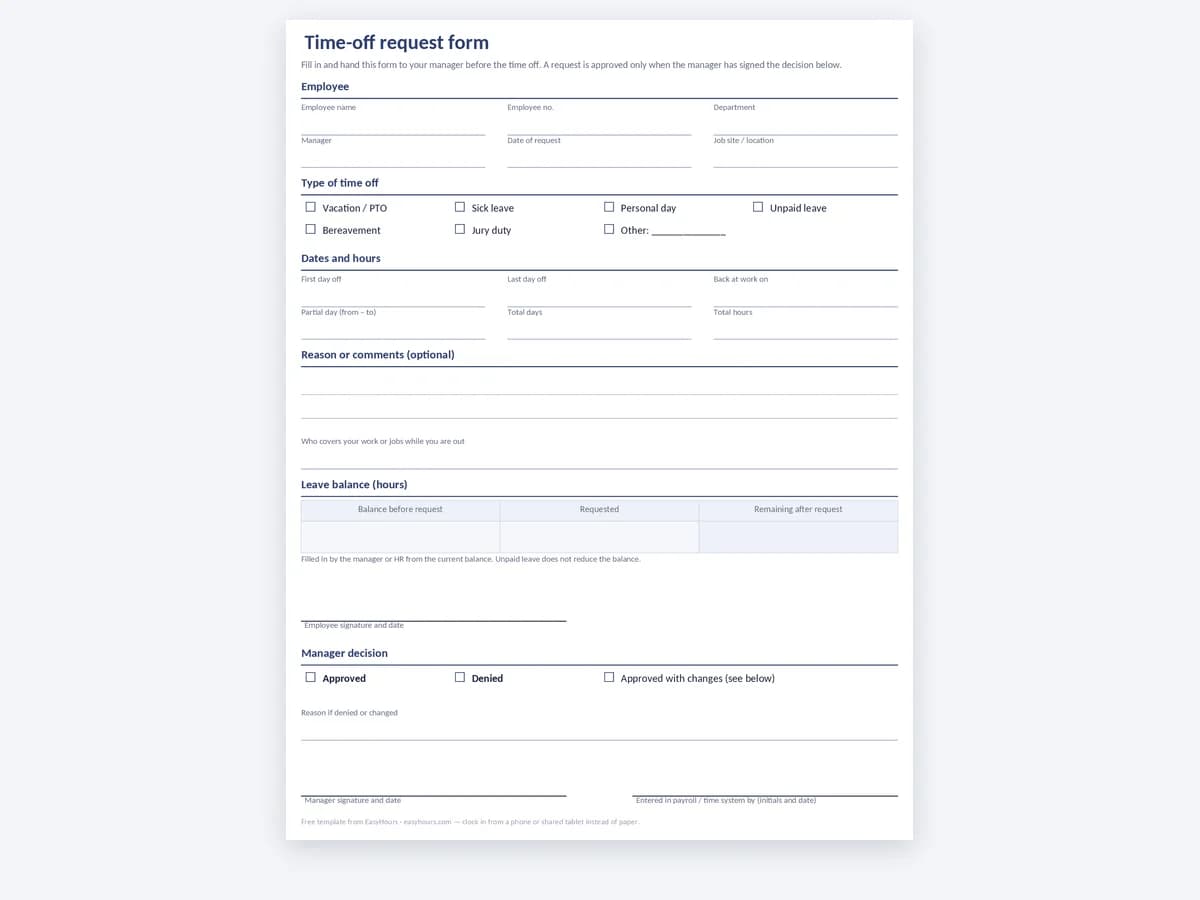
Employee time off request form
A one-page form where the employee fills in the dates, the type of leave and the reason, and the manager approves or declines with a signature. A balance box lets HR note the days taken and the days left before the request is filed.
- Vacation, sick, personal and unpaid leave
- Manager approval and signature
- Balance box for days used and left
Best for · Crews and teams that still handle leave requests on paper
In EasyHours · Employees request time off in the app, you approve it from your phone, and the balance updates by itself.
How to run a simple time off request process
A time off request form works best as part of a clear routine: employees know how and when to ask, managers know what to check, and everyone can see how much leave is left. These steps work for crews of five as well as teams of a hundred.
1. Request: make it easy to ask the right way
Tell people where to get the form, who to give it to and how much notice you expect for planned leave, for example two weeks for vacation. Sick days can't be planned, so say how employees should report them on the day and when the form can follow.
2. Approve: check coverage before you sign
Before approving, look at the work schedule for those dates. Make sure the shift or the job is still covered and that the employee has enough leave left. Answer quickly, and give a reason when you decline.
- Is the shift or job covered without overtime?
- Are too many people from the same crew already off?
- Does the employee have enough balance for this type of leave?
- Does the request fit any blackout periods in your policy?
3. Record: keep balances up to date
Once a request is approved, record the days in your leave tracker, update the employee's balance and add the absence to the schedule. Keep signed forms with your other payroll records so you can answer questions about pay and balances later.
PTO policy basics
Your written policy should say how leave is earned (all at once at the start of the year, or accrued per pay period), whether unused days carry over, how much notice employees need to give, and how requests are approved. Paid leave rules differ by state and city in the US, and some places require paid sick leave, so check the rules where your people work before you publish the policy.
Time off request form questions
What should a time off request form include?+
The employee's name, the first and last day of leave (or the hours for a partial day), the type of leave, an optional reason, the date of the request, and the employee's signature. The manager section needs an approve or decline choice, a signature and a date, plus room to note the remaining balance.
Can I edit the form?+
Yes. The Word version is fully editable, so you can add your logo, change the leave types to match your policy or add a field for a job number or crew. The PDF is ready to print as it is.
How much notice should employees give for time off?+
It's up to your policy, unless a law or union agreement sets it. Many employers ask for two weeks for vacation and same-day notice for sickness. Whatever you choose, write it in the policy and apply it the same way to everyone.
Where do I track the balance after approving a request?+
Use a yearly leave calendar per employee, like the one on our attendance sheet template page, or a leave feature in your time tracking system. Update it every time you approve a request so the balance on the next form is correct.
Can I deny a time off request?+
Usually yes for planned vacation when the business can't cover the work, as long as you follow your own policy consistently. Some types of leave, such as legally protected sick or family leave, have their own rules. This page is general information, not legal advice; check the rules for your state.
When should we stop using paper forms?+
When requests get lost between the site and the office, when you can't see who is off next week without digging through a folder, or when balances are often wrong. A leave feature that ties requests, approvals and balances together removes that work.
Handle time off requests in the app instead
In EasyHours, employees request leave from their phone, managers approve it, and balances update automatically. Approved leave sits alongside the tracked hours, ready for payroll export.